





Graphic Design Building Blocks 
Graphic Design Building Blocks: RGB and CMYK Color Spaces

Mitchell Albala
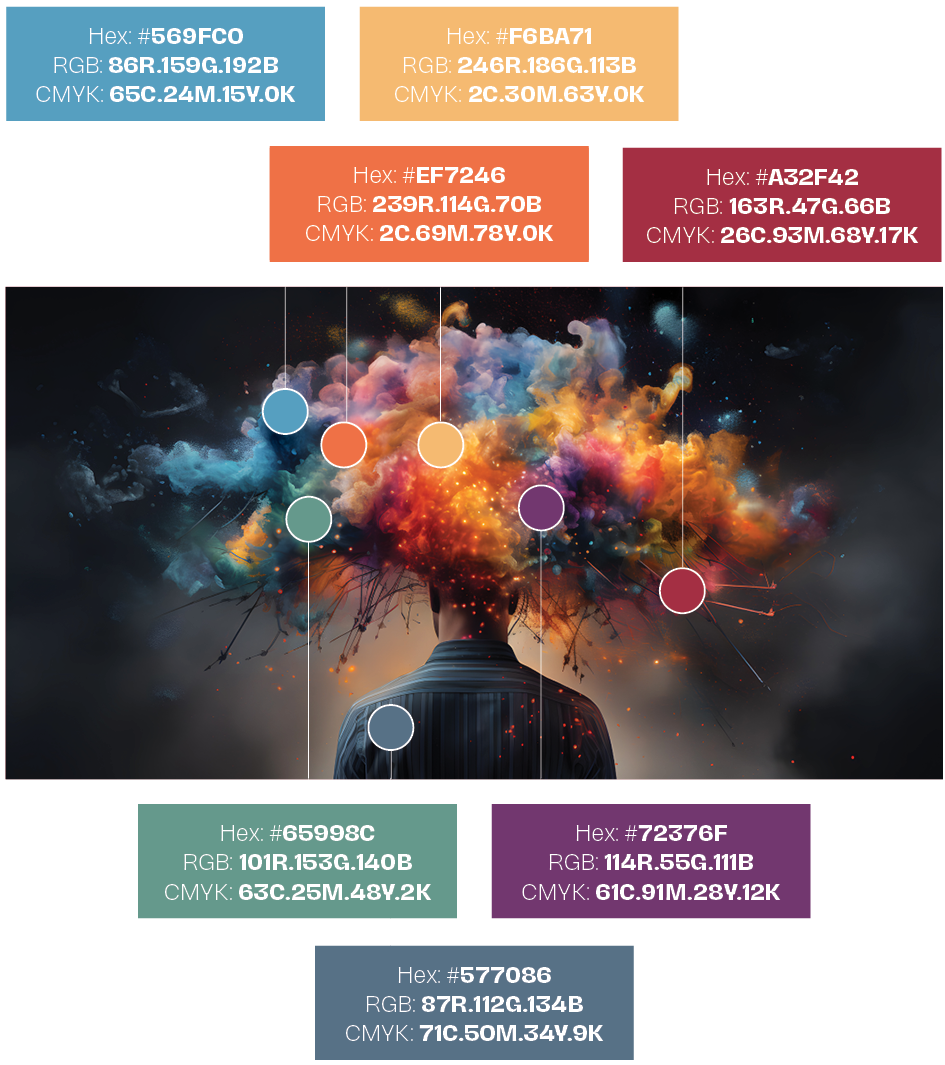
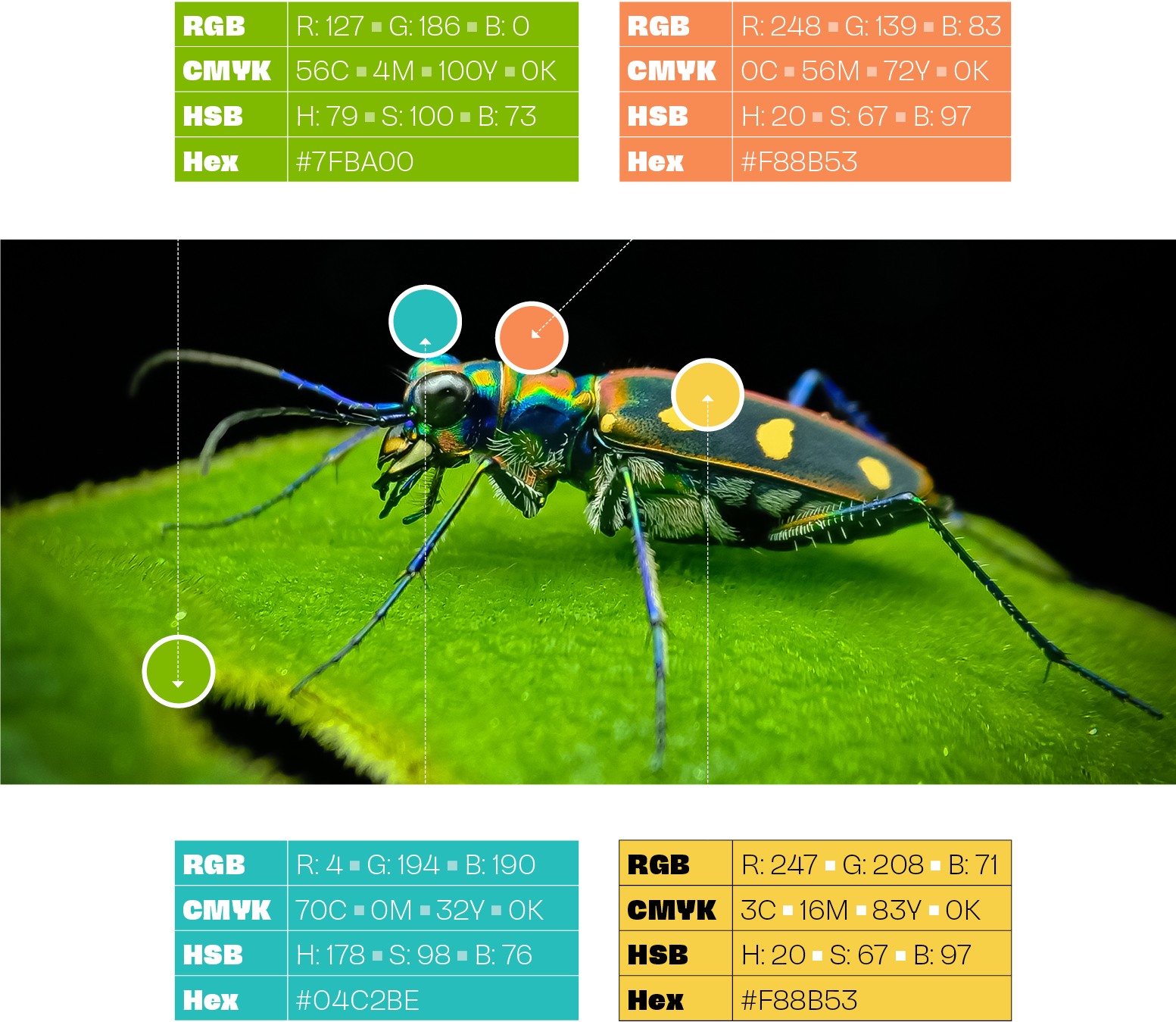
Above: Hexadecimal, RGB, and CMYK are common color spaces with distinct purposes. Hexadecimal uses a six-digit code to define colors, often used in web design for its simplicity and compatibility. RGB, representing Red, Green, and Blue, is ideal for digital displays as it mixes these colors to create a vast spectrum. On the other hand, CMYK, composed of Cyan, Magenta, Yellow, and Black, is primarily used in printing processes, where ink is layered to produce a wide range of colors. Understanding these color spaces enables designers to achieve precise color reproduction, ensuring visual consistency across various platforms.
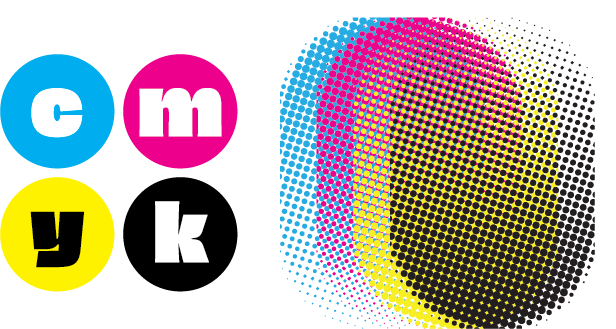
Above: CMYK (Cyan, Magenta, Yellow, Key/Black) is a color model used primarily in printing, where colors are created by varying percentages of these four ink colors. CMYK is subtractive, meaning colors are created by subtracting light from a white background. This model is used in everything from magazines and newspapers to packaging and signage. Upper right: a typical dot pattern as used in conventional CMYK printing; where dots overlap, new colors are created. bottom, top left: a designers uses a graphic design application to mix a CMYK color (solid magenta); bottom, top right: using the same tool, the designer mixes a custom CMYK color (purple). A printer makes plates from the designer’s file(s) and overlapping cyan, magenta and black dots will combine to make purple.

Above: RGB (Red, Green, Blue) is a color model used primarily in digital media, such as web design and photography. RGB is additive, meaning colors are created by adding light to a black background. Computer screens and digital cameras use RGB to display images with a wide range of colors and brightness levels. Left: overlapping red, green and blue circles (as used for web display). Unlike CMYK, in RGB, where the colors overlap, lighter colors display (yellow, magenta and cyan). In the middle, where all three colors overlap, pure white is created.
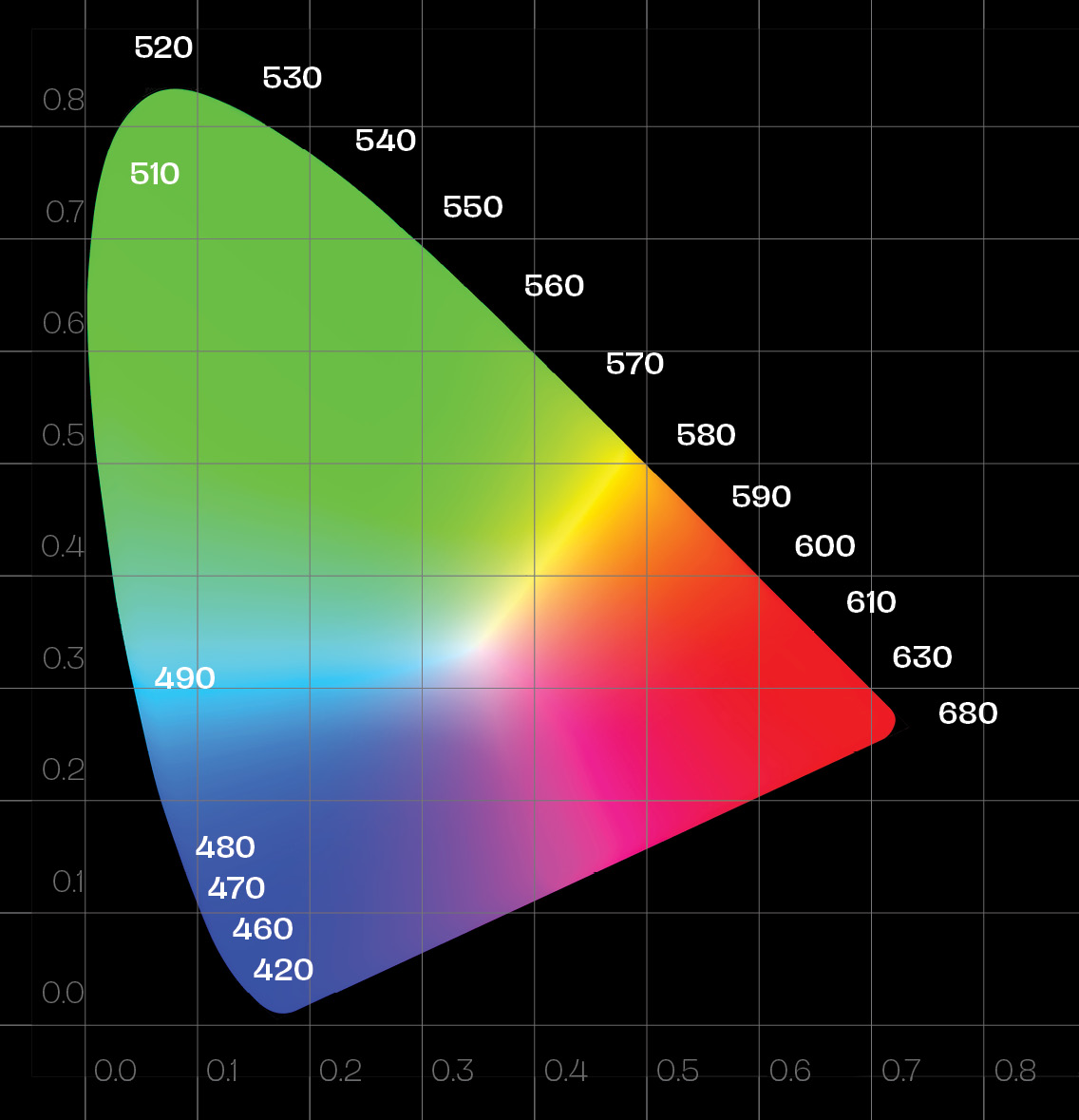
Above: The CIE 1931 Chromaticity standard is widely used to compare the color ranges (gamuts) of displays and files for human perception. Most colorspaces fall within this standard’s range, but some exceed it. However, colors outside the CIE range hold little practical value as the average human eye cannot perceive them.
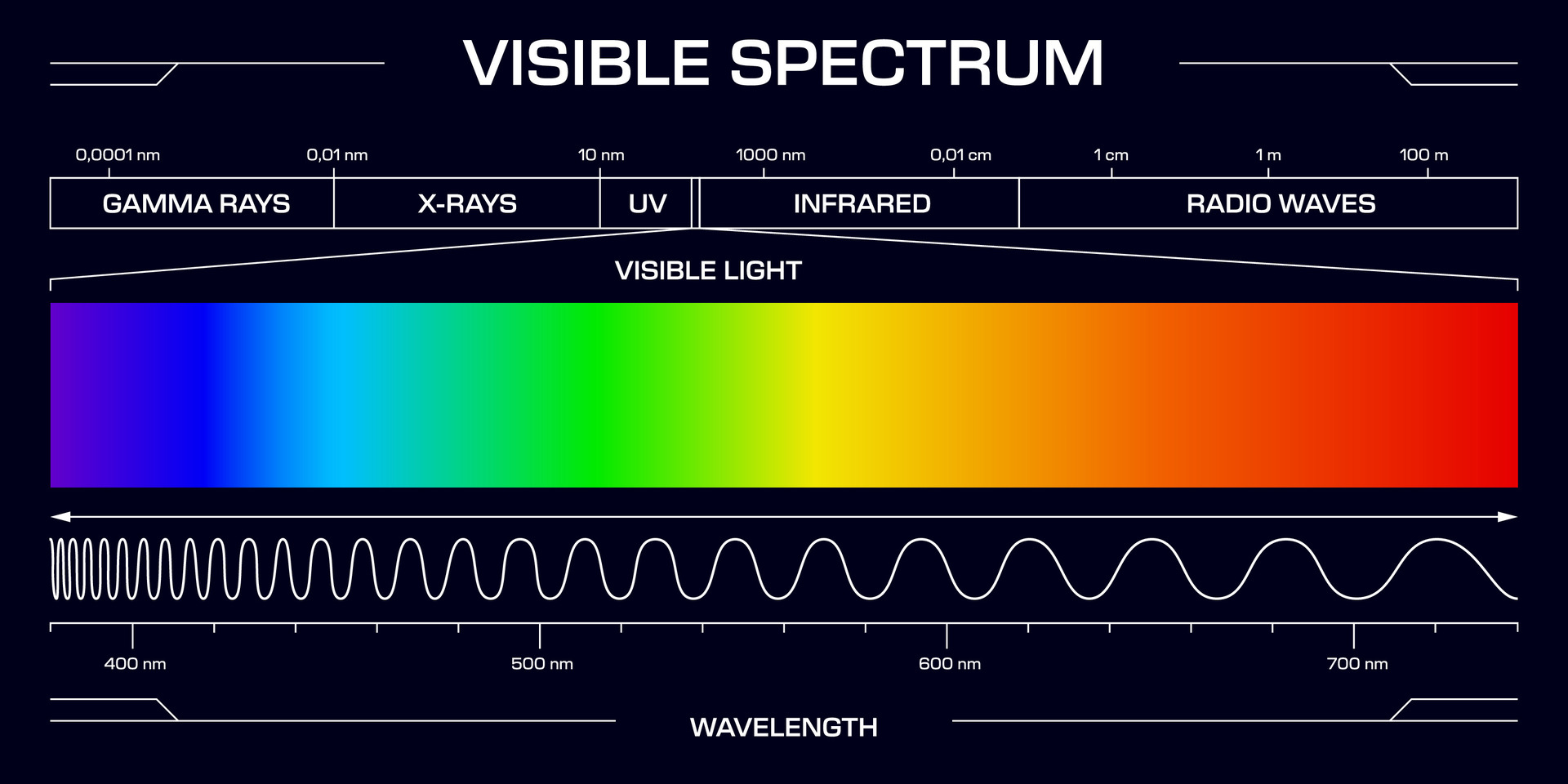
Above: The visible spectrum forms the scientific foundation of color theory in graphic design, defining the narrow band of electromagnetic radiation—roughly 380 to 740 nanometers—that the human eye can detect and translate into hue. Graphic designers harness this physical phenomenon to manipulate visual hierarchy, evoke emotional responses, and establish brand identity. By understanding how light splits into distinct wavelengths—ranging from high-frequency violets and blues to long-wavelength reds—designers strategically utilize color relationships such as contrast, harmony, and saturation to guide a viewer’s eye across a composition. Furthermore, the visible spectrum dictates the translation between digital displays and physical media: screens emit light directly through the additive RGB model, whereas print relies on subtractive CMYK pigments to reflect ambient light. Mastering the nuances of light perception enables designers to maintain visual consistency across media, satisfy accessibility standards like high contrast, and craft compelling visual experiences.

Learn More About the Building Blocks of Graphic Design



CMYK color printing bridges digital graphic design and tangible print by using overlapping subtractive dots of cyan, magenta, yellow, and black inks to faithfully reproduce complex, full-color imagery on paper.
Graphic design shapes a brand’s visual identity through cohesive color palettes, intentional typography, and memorable logos, translating a company’s core values into a distinct, recognizable personality that builds trust and recognition with its audience.
Bridging physical space and visual communication, wayfinding graphic design relies on intuitive visual cues—ranging from clear signage systems and spatial maps to color-coded pathways—to guide people effortlessly through complex environments.
Graphic designers use very different color formulas depending on the type of job they’re working on.
Print design: A designer preparing a job for a printing press will mostly work in CMYK (above right) although it’s possible to work in RGB (above left) and achieve almost the same results. Modern page design (such as Adobe InDesign) and photo and graphic editing applications (Adobe Photoshop and Adobe Illustrator) do a remarkably good job of converting RGB to CMYK.
Web design: A designer working on a website will almost always work primarily RGB. However, that designer may use the hexidecimal color model (above left) to achieve the same results as RGB. It’s more unusual to work in HSL, but some designers may prefer that. Hexidecimal and HSL formulas will display the same as RGB formulas.
Learn More About the Building Blocks of Graphic Design


White space, far from being mere empty area, acts as an active structural element in graphic design that gives visual components room to breathe, guides the viewer’s eye through a clear hierarchy, and elevates overall legibility and sophistication.
An infographics graphic designer translates complex data and information into clear, visually engaging illustrations and charts that make narrative insights effortlessly readable for any audience.
A skilled graphic designer seamlessly bridges the digital and print worlds by designing in the RGB color model to maximize color vibrancy on screens, while masterfully translating those assets into the CMYK color space to guarantee exact hue fidelity and sharp contrast for physical printing.
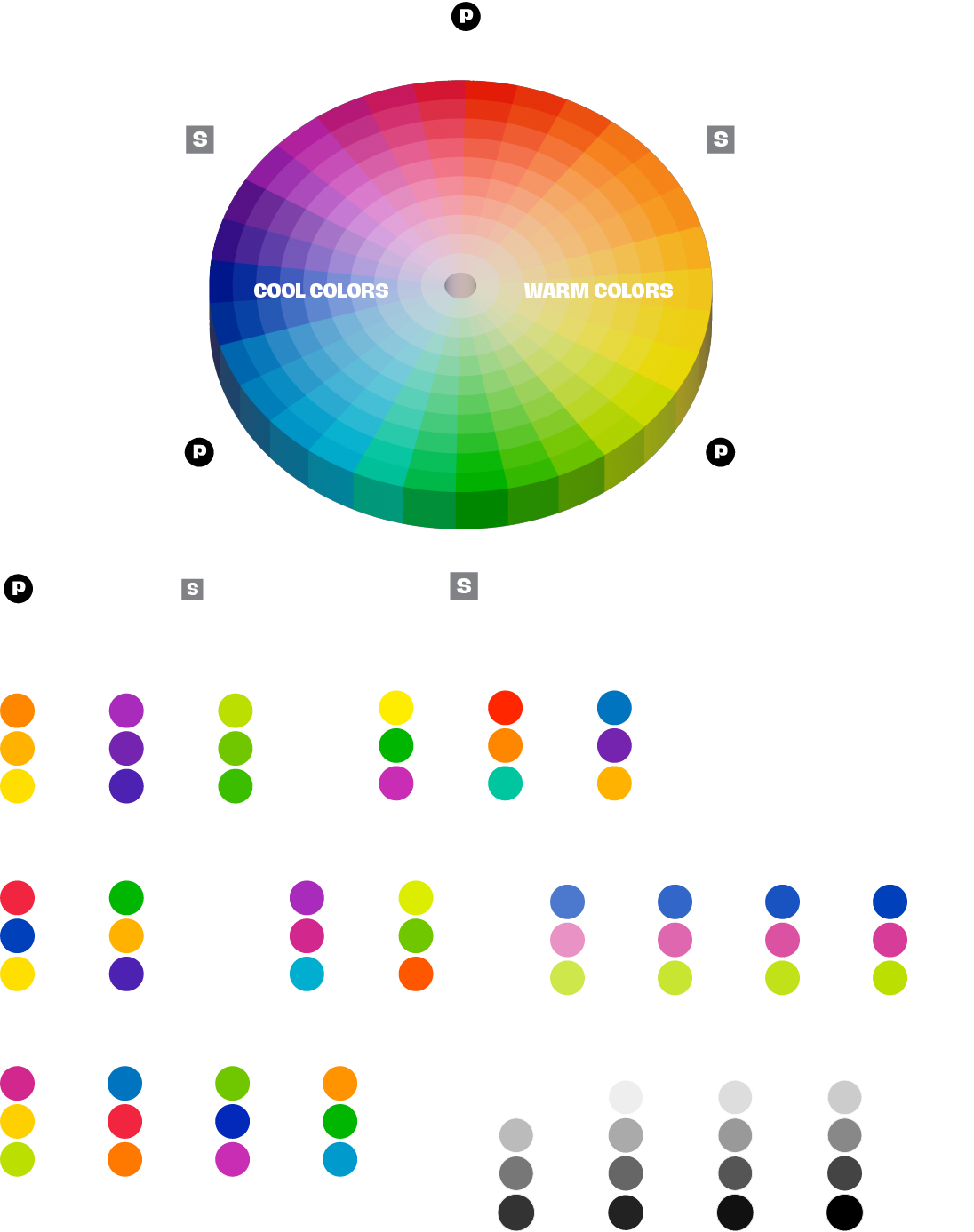
Above: Graphic designers use color theory and the color wheel in a variety of ways to create visually appealing and effective designs. By understanding the principles behind color theory, such as the relationships between colors and how they interact with each other, designers can make intentional choices about which colors to use in their projects. The color wheel serves as a useful tool for selecting complementary colors, analogous colors, or creating color schemes that convey specific emotions or messages. By applying these concepts, graphic designers can create designs that are not only aesthetically pleasing but also effectively communicate their intended message to their audience. Ultimately, the strategic use of color theory and the color wheel can enhance the overall impact and effectiveness of a design.
Above: An object’s color is determined by the wavelengths of light it reflects into the eye or camera sensor. The color of light is measured by its wavelength, as illustrated in the diagram, which displays the full intensity of each spectral color. Variations like pink, being a faded red, are not included as they are not pure spectral colors.
Hexadecimal, RGB, and CMYK are common color spaces with distinct purposes. Hexadecimal uses a six-digit code to define colors, often used in web design for its simplicity and compatibility. RGB, representing Red, Green, and Blue, is ideal for digital displays as it mixes these colors to create a vast spectrum. On the other hand, CMYK, composed of Cyan, Magenta, Yellow, and Black, is primarily used in printing processes, where ink is layered to produce a wide range of colors. Understanding these color spaces enables designers to achieve precise color reproduction, ensuring visual consistency across various platforms.
CMYK (Cyan, Magenta, Yellow, Black) is a color model used primarily in printing, where colors are created by varying percentages of these four ink colors. CMYK is subtractive, meaning colors are created by subtracting light from a white background. This model is used in everything from magazines and newspapers to packaging and signage. Upper right: a typical dot pattern as used in conventional CMYK printing; where dots overlap, new colors are created. bottom, top left: a designers uses a graphic design application to mix a CMYK color (solid magenta); bottom, top right: using the same tool, the designer mixes a custom CMYK color (purple). A printer makes plates from the designer’s file(s) and overlapping cyan, magenta and black dots will combine to make purple.
Designers play a crucial role in both print and web design by utilizing the CMYK and RGB color models to create visually appealing and cohesive designs. While CMYK is commonly used for print projects due to its ability to accurately reproduce colors on physical substrates, RGB is ideal for web design as it can display a wider range of colors on digital screens. By leveraging these color models effectively, designers can ensure that their creations maintain consistency and impact across different mediums, ultimately enhancing the overall visual experience for their target audience. The sliders above show how a designer uses an application, such as Adobe Photoshop, Illustrator or InDesign to mix CMYK colors (top) and the approximate RGB equivalents. The yellow “warning” triangle is telling the designer that printers can’t print the color because it’s out of the gamut (range) of CMYK printers.